Using the ip classless command


Using the ip classless command 
7.2.3
This page will explain what the ip classless command is and how it is used.
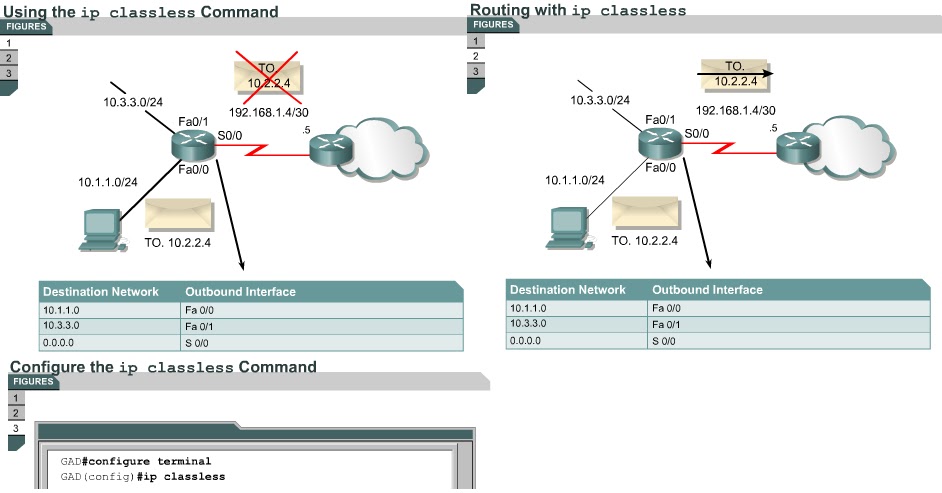
Sometimes a router receives packets destined for an unknown subnet of a network that has directly connected subnets. Use the ip classless global configuration command to instruct the Cisco IOS software to forward these packets to the best supernet route. A supernet route is a route that covers a greater range of subnets with a single entry. For example, if an enterprise uses the entire subnet 10.10.0.0 /16, then a supernet route for 10.10.10.0 /24 would be 10.10.0.0 /16. The ip classless command is enabled by default in Cisco IOS Software Release 11.3 and later. To disable this feature, use the no form of this command.
When this feature is disabled any packets received that are destined for a subnet that falls within the subnetwork addressing scheme of the router will be discarded.
IP classless only affects the operation of the forwarding processes in IOS. IP classless does not affect the way the routing table is built. This is the essence of classful routing. If one part of a major network is known, but the subnet toward which the packet is destined within that major network is unknown, the packet is dropped.
The most confusing aspect of this rule is that the router only uses the default route if the major network destination does not exist in the routing table. A router by default assumes that all subnets of a directly connected network should be present in the routing table. If a packet is received with an unknown destination address within an unknown subnet of a directly attached network, the router assumes that the subnet does not exist. So the router will drop the packet even if there is a default route. To resolve this problem, configure ip classless on the router. This allows the router to ignore the classful boundaries of the networks in its routing table and simply route to the default route. -
The Lab Activity will help students become more familiar with the ip classless command.
The next page describes some methods that are used to reduce routing loops.

Comments

Popular posts from this blog

OSI layers / Peer-to-peer communications / TCP/IP model

OSI layers 2.3.4 This page discusses the seven layers of the OSI model. The OSI reference model is a framework that is used to understand how information travels throughout a network. The OSI reference model explains how packets travel through the various layers to another device on a network, even if the sender and destination have different types of network media. In the OSI reference model, there are seven numbered layers, each of which illustrates a particular network function. - Dividing the network into seven layers provides the following advantages: • It breaks network communication into smaller, more manageable parts. • It standardizes network components to allow multiple vendor development and support. • It allows different types of network hardware and software to communicate with each other. • It prevents changes in one layer from affecting other layers. • It divides network communication into smaller parts to make learning it easier to understand. In the foll...

Advantages and disadvantages of link-state routing

Advantages and disadvantages of link-state routing 2.1.5  This page lists the advantages and disadvantages of link-state routing protocols. The following are advantages of link-state routing protocols:  Link-state protocols use cost metrics to choose paths through the network. The cost metric reflects the capacity of the links on those paths. Link-state protocols use triggered updates and LSA floods to immediately report changes in the network topology to all routers in the network. This leads to fast convergence times. Each router has a complete and synchronized picture of the network. Therefore, it is very difficult for routing loops to occur. Routers use the latest information to make the best routing decisions. The link-state database sizes can be minimized with careful network design. This leads to smaller Dijkstra calculations and faster convergence. Every router, at the very least, maps the topology of it...

Ports for services

Ports for services 10.2.2  Services running on hosts must have a port number assigned to them so communication can occur. A remote host attempting to connect to a service expects that service to use specific transport layer protocols and ports. Some ports, which are defined in RFC 1700, are known as the well-known ports. These ports are reserved in both TCP and UDP.  These well-known ports define applications that run above the transport layer protocols. For example, a server that runs FTP will use ports 20 and 21 to forward TCP connections from clients to its FTP application. This allows the server to determine which service a client requests. TCP and UDP use port numbers to determine the correct service to which requests are forwarded. The next page will discuss ports in greater detail.