Destination unreachable message


Destination unreachable message 
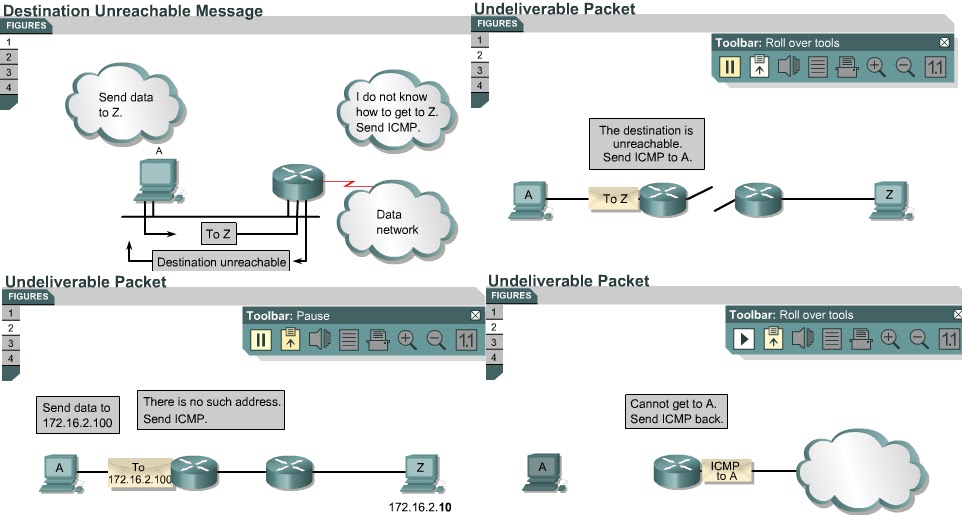
8.1.8 This page will explain what a destination unreachable message is and why it occurs.
Datagrams cannot always be forwarded to their destinations. Hardware failures, improper protocol configuration, down interfaces, and incorrect routing information are some of the factors that prevent successful delivery. In these cases, ICMP sends the sender a destination unreachable message, which indicates that the datagram could not be forwarded. 
Figure shows an ICMP destination unreachable message header. The value of 3 in the type field indicates it is a destination unreachable message. The code value indicates the reason the packet could not be delivered. Figure has a code value of 0, which indicates that the network was unreachable. Figure shows the meaning for each possible code value in a destination unreachable message.
A destination unreachable message may also be sent when packet fragmentation is required to forward a packet. Fragmentation is usually necessary when a datagram is forwarded from a Token Ring network to an Ethernet network. If the datagram does not allow fragmentation, the packet cannot be forwarded, so a destination unreachable message will be sent. Destination unreachable messages may also be generated if IP-related services such as FTP or Web services are unavailable. To effectively troubleshoot an IP network, it is necessary to understand the various causes of ICMP destination unreachable messages.
The next page introduces parameter problem messages.

Comments

Popular posts from this blog

OSI layers / Peer-to-peer communications / TCP/IP model

OSI layers 2.3.4 This page discusses the seven layers of the OSI model. The OSI reference model is a framework that is used to understand how information travels throughout a network. The OSI reference model explains how packets travel through the various layers to another device on a network, even if the sender and destination have different types of network media. In the OSI reference model, there are seven numbered layers, each of which illustrates a particular network function. - Dividing the network into seven layers provides the following advantages: • It breaks network communication into smaller, more manageable parts. • It standardizes network components to allow multiple vendor development and support. • It allows different types of network hardware and software to communicate with each other. • It prevents changes in one layer from affecting other layers. • It divides network communication into smaller parts to make learning it easier to understand. In the foll...

Advantages and disadvantages of link-state routing

Advantages and disadvantages of link-state routing 2.1.5  This page lists the advantages and disadvantages of link-state routing protocols. The following are advantages of link-state routing protocols:  Link-state protocols use cost metrics to choose paths through the network. The cost metric reflects the capacity of the links on those paths. Link-state protocols use triggered updates and LSA floods to immediately report changes in the network topology to all routers in the network. This leads to fast convergence times. Each router has a complete and synchronized picture of the network. Therefore, it is very difficult for routing loops to occur. Routers use the latest information to make the best routing decisions. The link-state database sizes can be minimized with careful network design. This leads to smaller Dijkstra calculations and faster convergence. Every router, at the very least, maps the topology of it...

Ports for services

Ports for services 10.2.2  Services running on hosts must have a port number assigned to them so communication can occur. A remote host attempting to connect to a service expects that service to use specific transport layer protocols and ports. Some ports, which are defined in RFC 1700, are known as the well-known ports. These ports are reserved in both TCP and UDP.  These well-known ports define applications that run above the transport layer protocols. For example, a server that runs FTP will use ports 20 and 21 to forward TCP connections from clients to its FTP application. This allows the server to determine which service a client requests. TCP and UDP use port numbers to determine the correct service to which requests are forwarded. The next page will discuss ports in greater detail.