Unreachable networks

Unreachable networks
8.1.4 This page will explain why some networks are unreachable.


Network communication depends on some basic conditions that must be met. First, the TCP/IP protocol must be properly configured for devices that send and receive data. This includes the installation of the TCP/IP protocol and proper configuration of an IP address and subnet mask. A default gateway must also be configured if datagrams are to travel outside of the local network. Second, intermediary devices must be in place to route the datagram from the source device and its network to the destination network. Routers perform this function. A router also must have the TCP/IP protocol properly configured on its interfaces, and it must use an appropriate routing protocol.

If these conditions are not met, then network communication cannot take place. For instance, the sending device may address the datagram to a non-existent IP address or to a destination device that is disconnected from its network. Routers can also be points of failure if a connecting interface is down or if the router does not have the information necessary to find the destination network. If a destination network is not accessible, it is said to be an unreachable network.

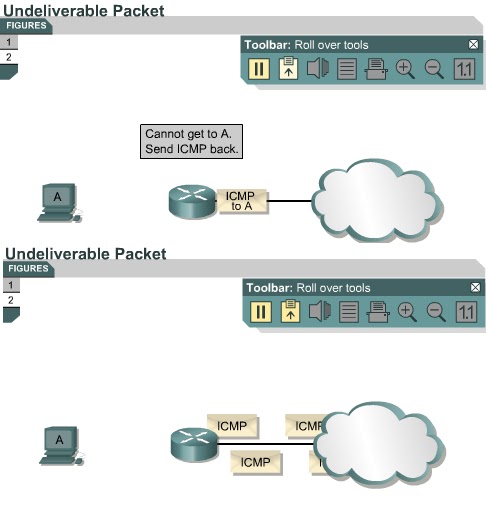
Figures and show a router that receives a packet that cannot be delivered. The packet is undeliverable because there is no known route to the destination. Because of this, the router sends an ICMP host unreachable message to the source.

The next page will teach students how to test network reachability

Comments

Popular posts from this blog

OSI layers / Peer-to-peer communications / TCP/IP model

OSI layers 2.3.4 This page discusses the seven layers of the OSI model. The OSI reference model is a framework that is used to understand how information travels throughout a network. The OSI reference model explains how packets travel through the various layers to another device on a network, even if the sender and destination have different types of network media. In the OSI reference model, there are seven numbered layers, each of which illustrates a particular network function. - Dividing the network into seven layers provides the following advantages: • It breaks network communication into smaller, more manageable parts. • It standardizes network components to allow multiple vendor development and support. • It allows different types of network hardware and software to communicate with each other. • It prevents changes in one layer from affecting other layers. • It divides network communication into smaller parts to make learning it easier to understand. In the foll...

Advantages and disadvantages of link-state routing

Advantages and disadvantages of link-state routing 2.1.5  This page lists the advantages and disadvantages of link-state routing protocols. The following are advantages of link-state routing protocols:  Link-state protocols use cost metrics to choose paths through the network. The cost metric reflects the capacity of the links on those paths. Link-state protocols use triggered updates and LSA floods to immediately report changes in the network topology to all routers in the network. This leads to fast convergence times. Each router has a complete and synchronized picture of the network. Therefore, it is very difficult for routing loops to occur. Routers use the latest information to make the best routing decisions. The link-state database sizes can be minimized with careful network design. This leads to smaller Dijkstra calculations and faster convergence. Every router, at the very least, maps the topology of it...

Ports for services

Ports for services 10.2.2  Services running on hosts must have a port number assigned to them so communication can occur. A remote host attempting to connect to a service expects that service to use specific transport layer protocols and ports. Some ports, which are defined in RFC 1700, are known as the well-known ports. These ports are reserved in both TCP and UDP.  These well-known ports define applications that run above the transport layer protocols. For example, a server that runs FTP will use ports 20 and 21 to forward TCP connections from clients to its FTP application. This allows the server to determine which service a client requests. TCP and UDP use port numbers to determine the correct service to which requests are forwarded. The next page will discuss ports in greater detail.