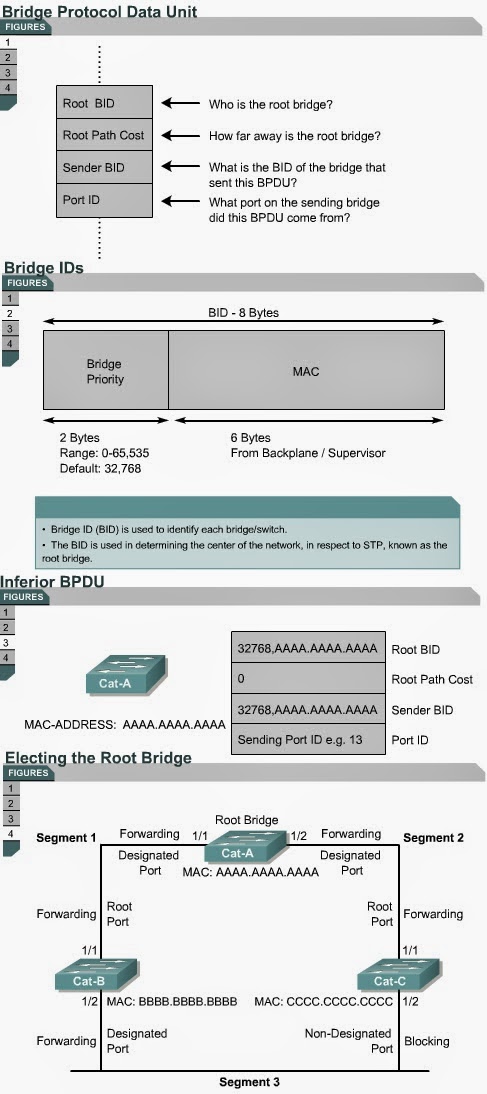
7.2.4 This page will explain how a root bridge is selected in an STP network.
The first decision that all switches in the network make, is to identify the root bridge. The position of the root bridge in a network affects the traffic flow.
When a switch is turned on, the spanning-tree algorithm is used to identify the root bridge. BPDUs are sent out with the bridge ID (BID). The BID consists of a bridge priority that defaults to 32768 and the switch MAC address. By default BPDUs are sent every two seconds.
When a switch first starts up, it assumes it is the root switch and sends BPDUs that contain the switch MAC address in both the root and sender BID. These BPDUs are considered inferior because they are generated from the designated switch that has lost its link to the root bridge. The designated switch transmits the BPDUs with the information that it is the root bridge as well as the designated bridge. These BPDUs contain the switch MAC address in both the root and sender BID. The BIDs are received by all switches. Each switch replaces higher root BIDs with lower root BIDs in the BPDUs that are sent out. All switches receive the BPDUs and determine that the switch with the lowest root BID value will be the root bridge. Network administrators can set the switch priority to a smaller value than the default, which makes the BID smaller. This should only be implemented when the traffic flow on the network is well understood. The Lab Activities will teach students how to select the root bridge for a basic switch configuration. The next page will discuss the STP port states.
Stages of spanning-tree port states
7.2.5 This page will explain the five port states of a switch that uses
STP.
Time is required for protocol information to propagate throughout
a switched network. Topology changes in one part of a network are not instantly
known in other parts of the network due to propagation delay. Data loops can
occur when a switch changes the state of a port too quickly. Each port on a switch that uses the Spanning-Tree Protocol has one of five states, as shown in Figure
 .
.In the blocking state, ports can only receive BPDUs. Data frames are discarded and no addresses can be learned. It may take up to 20 seconds to change from this state.
Ports transition from the blocking state to the listening state. In this state, switches determine if there are any other paths to the root bridge. The path that is not the least cost path to the root bridge returns to the blocking state. The listening period is called the forward delay and lasts for 15 seconds. In the listening state, data is not forwarded and MAC addresses are not learned. BPDUs are still processed.
Ports transition from the listening state to the learning state. In this state, data is not forwarded, but MAC addresses are learned from traffic that is received. The learning state lasts for 15 seconds and is also called the forward delay. BPDUs are still processed.
Ports transitions from the learning state to the forwarding state. In this state user data is forwarded and MAC addresses continue to be learned. BPDUs are still processed.
A port can be in a disabled state. This disabled state can occur when an administrator shuts down the port or the port fails.
The time values given for each state are the default values. These values have been calculated on an assumption that there will be a maximum of seven switches in any branch of the spanning-tree from the root bridge.
The Interactive Media Activities will help students learn the five spanning-tree port states.

Comments
Post a Comment