Executing adds, moves, and changes / Managing switch operating system file

Executing adds, moves, and changes 
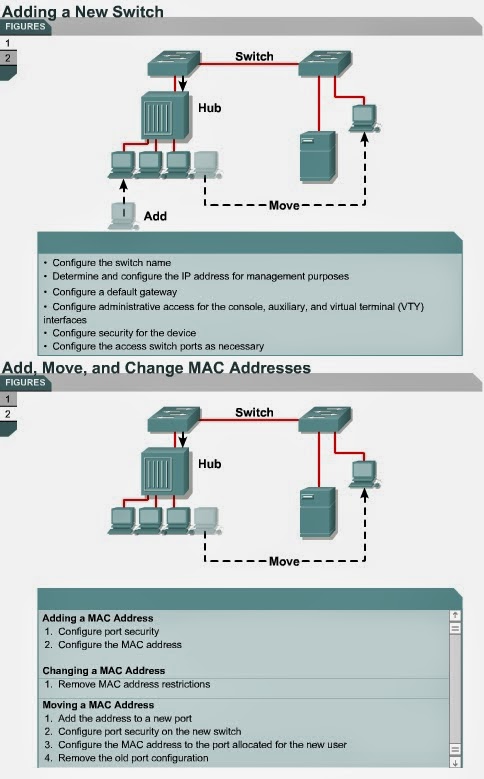
6.2.6 The following are parameters that should be configured on a new switch that is added to a network: 
  • Switch name
  • IP address for the switch in the management VLAN
  • A default gateway
  • Line passwords
When a host is moved from one port or switch to another, configurations that can cause unexpected behavior should be removed. The switch can then be reconfigured to reflect the changes. 

The Lab Activities will teach students how to add, move, and change MAC addresses on a switch.


Managing switch operating system file
6.2.7 Network administrators should document and maintain the operational configuration files for network devices. The most current running-configuration file should be backed up on a server or disk. This is not only essential documentation, but is very useful if a configuration needs to be restored. 
The IOS should also be backed up to a local server. The IOS can then be reloaded to flash memory if needed.

The Lab Activities will show students how to create, verify, back up, and then restore a basic switch configuration.

Comments

Popular posts from this blog

OSI layers / Peer-to-peer communications / TCP/IP model

OSI layers 2.3.4 This page discusses the seven layers of the OSI model. The OSI reference model is a framework that is used to understand how information travels throughout a network. The OSI reference model explains how packets travel through the various layers to another device on a network, even if the sender and destination have different types of network media. In the OSI reference model, there are seven numbered layers, each of which illustrates a particular network function. - Dividing the network into seven layers provides the following advantages: • It breaks network communication into smaller, more manageable parts. • It standardizes network components to allow multiple vendor development and support. • It allows different types of network hardware and software to communicate with each other. • It prevents changes in one layer from affecting other layers. • It divides network communication into smaller parts to make learning it easier to understand. In the foll...

Advantages and disadvantages of link-state routing

Advantages and disadvantages of link-state routing 2.1.5  This page lists the advantages and disadvantages of link-state routing protocols. The following are advantages of link-state routing protocols:  Link-state protocols use cost metrics to choose paths through the network. The cost metric reflects the capacity of the links on those paths. Link-state protocols use triggered updates and LSA floods to immediately report changes in the network topology to all routers in the network. This leads to fast convergence times. Each router has a complete and synchronized picture of the network. Therefore, it is very difficult for routing loops to occur. Routers use the latest information to make the best routing decisions. The link-state database sizes can be minimized with careful network design. This leads to smaller Dijkstra calculations and faster convergence. Every router, at the very least, maps the topology of it...

PC Basic...

• Backplane – A backplane is an electronic circuit board containing circuitry and sockets into which additional electronic devices on other circuit boards or cards can be plugged; in a computer, generally synonymous with or part of the motherboard. • Network interface card (NIC) – An expansion board inserted into a computer so that the computer can be connected to a network. • Video card – A board that plugs into a PC to give it display capabilities. • Audio card – An expansion board that enables a computer to manipulate and output sounds. • Parallel port – An interface capable of transferring more than one bit simultaneously that is used to connect external devices such as printers. • Serial port – An interface that can be used for serial communication in which only one bit is transmitted at a time. • Mouse port – A port used to connect a mouse to a PC. • USB port – A Universal Serial Bus connector. A USB port connects devices such as a mouse or printer to the computer ...