Network protocols / Local-area networks (LANs)


Network protocols
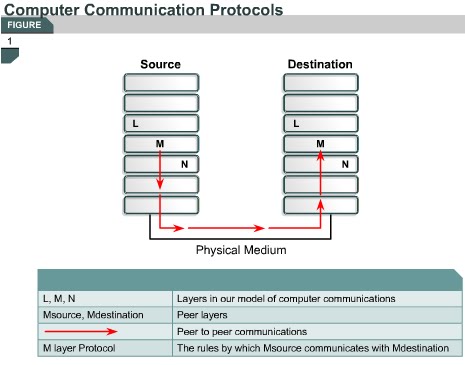
2.1.5 Protocol suites are collections of protocols that enable network communication between hosts. A protocol is a formal description of a set of rules and conventions that govern a particular aspect of how devices on a network communicate. Protocols determine the format, timing, sequencing, and error control in data communication. Without protocols, the computer cannot make or rebuild the stream of incoming bits from another computer into the original format.


Protocols control all aspects of data communication, which include the following:

• How the physical network is built
• How computers connect to the network
• How the data is formatted for transmission
• How that data is sent
• How to deal with errors

These network rules are created and maintained by many different organizations and committees. Included in these groups are the Institute of Electrical and Electronic Engineers (IEEE), American National Standards Institute (ANSI), Telecommunications Industry Association (TIA), Electronic Industries Alliance (EIA) and the International Telecommunications Union (ITU), formerly known as the Comité Consultatif International Téléphonique et Télégraphique (CCITT).

Local-area networks (LANs)
2.1.6 LANs consist of the following components:


• Computers
• Network interface cards
• Peripheral devices
• Networking media
• Network devices

LANs allow businesses to locally share computer files and printers efficiently and make internal communications possible. A good example of this technology is e-mail. LANs manage data, local communications, and computing equipment.

Some common LAN technologies include the following:

• Ethernet
• Token Ring
• FDDI


WANs interconnect LANs, which then provide access to computers or file servers in other locations. Because WANs connect user networks over a large geographical area, they make it possible for businesses to communicate across great distances. WANs allow computers, printers, and other devices on a LAN to be shared with distant locations. WANs provide instant communications across large geographic areas.


Collaboration software provides access to real-time information and resources and allows meetings to be held remotely. WANs have created a new class of workers called telecommuters. These people never have to leave their homes to go to work.

WANs are designed to do the following:

• Operate over a large and geographically separated area

• Allow users to have real-time communication capabilities with other users

• Provide full-time remote resources connected to local services

• Provide e-mail, Internet, file transfer, and e-commerce services

Some common WAN technologies include the following:

• Modems

• Integrated Services Digital Network (ISDN)

• Digital subscriber line (DSL)

• Frame Relay

• T1, E1, T3, and E3

• Synchronous Optical Network (SONET)

The next page will introduce metropolitan-area networks (MANs).

Comments

Popular posts from this blog

OSI layers / Peer-to-peer communications / TCP/IP model

OSI layers 2.3.4 This page discusses the seven layers of the OSI model. The OSI reference model is a framework that is used to understand how information travels throughout a network. The OSI reference model explains how packets travel through the various layers to another device on a network, even if the sender and destination have different types of network media. In the OSI reference model, there are seven numbered layers, each of which illustrates a particular network function. - Dividing the network into seven layers provides the following advantages: • It breaks network communication into smaller, more manageable parts. • It standardizes network components to allow multiple vendor development and support. • It allows different types of network hardware and software to communicate with each other. • It prevents changes in one layer from affecting other layers. • It divides network communication into smaller parts to make learning it easier to understand. In the foll...

Advantages and disadvantages of link-state routing

Advantages and disadvantages of link-state routing 2.1.5  This page lists the advantages and disadvantages of link-state routing protocols. The following are advantages of link-state routing protocols:  Link-state protocols use cost metrics to choose paths through the network. The cost metric reflects the capacity of the links on those paths. Link-state protocols use triggered updates and LSA floods to immediately report changes in the network topology to all routers in the network. This leads to fast convergence times. Each router has a complete and synchronized picture of the network. Therefore, it is very difficult for routing loops to occur. Routers use the latest information to make the best routing decisions. The link-state database sizes can be minimized with careful network design. This leads to smaller Dijkstra calculations and faster convergence. Every router, at the very least, maps the topology of it...

PC Basic...

• Backplane – A backplane is an electronic circuit board containing circuitry and sockets into which additional electronic devices on other circuit boards or cards can be plugged; in a computer, generally synonymous with or part of the motherboard. • Network interface card (NIC) – An expansion board inserted into a computer so that the computer can be connected to a network. • Video card – A board that plugs into a PC to give it display capabilities. • Audio card – An expansion board that enables a computer to manipulate and output sounds. • Parallel port – An interface capable of transferring more than one bit simultaneously that is used to connect external devices such as printers. • Serial port – An interface that can be used for serial communication in which only one bit is transmitted at a time. • Mouse port – A port used to connect a mouse to a PC. • USB port – A Universal Serial Bus connector. A USB port connects devices such as a mouse or printer to the computer ...